
Anatomy of my Daily Note
I've been journaling since...checks the app...2012. There are many gaps in this decade+, but I've been fairly consistent for a good three years, more so in the last year and a half.
I used Day One for most of this journey, but the habit finally clicked with the introduction of Daily Notes in Craft: this was easy to remember, it added structure, and I could link to events on my calendar, or to other notes in the app, providing context and slowly expanding my digital garden/PKM/whatever. But I didn't entirely trust Craft for this task, so I kept Day One in "sync" (just in case)—which came in pretty handy when I cancelled that account and moved to Obsidian. By this time however, backlinks were ingrained:
I've decided to keep the journal habit in Day One and use Obsidian for interstitial and work related notes. This way I can link to books or projects and create backlinks. All entries will be exported to Day One at the end of the day. [1]
(From my personal journal, December 2022)
That system worked out fine—problem is, I much prefer writing in Obsidian: it's where I write everything else, I can add links anywhere in the text, plus the app is customizable and much more streamlined overall. So, for a little over a month now I've gone back to mainly "syncing" entries into Day One (just in case), and doing all my journaling in Obsidian, taking advantage of its own built-in Daily Note feature.
I created a template for this, using markdown styles that translate well in both apps (I checked)—so all that's needed to keep Day One up to date is just a quick copy/paste operation at the end of my day. [2]

That's my current layout, and the note I wake up to every morning, ready to be filled. Here’s how it works.
1
The title and dateline are automatically generated through two Obsidian core plugins—Daily Note and Templates:
Daily Note syntax: YYYY/MM-MMM/YYYY-MM-DD ddd. This creates the filename but also files the note into dated subfolders (2023/05 May/nameofdailynote). I also have the hotkey command-shift-D assigned to open, or create, the daily note (depending on the file existing or not).
Templates syntax: dddd, MMMM DD, YYYY. I like this format—it feels more "literary".
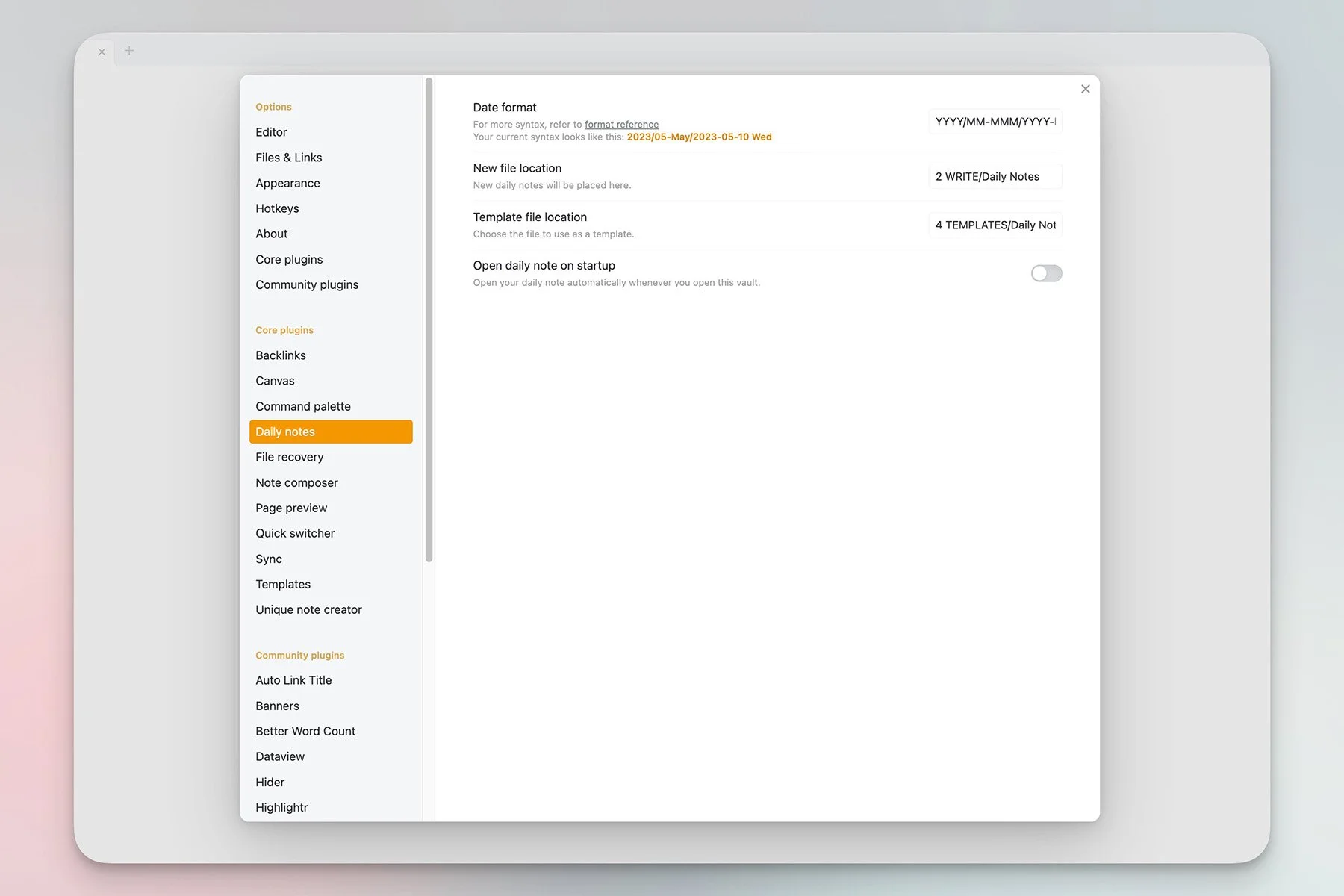

2
Those colourful boxes are Callouts. This is another built-in Obsidian feature, but I've added a CSS snippet called MCL Multi Column to create multi-column views.
3
Another Callout, this one as a single-column. The location and weather info is generated by an Apple Shortcut that I found online (don't remember the source), and modified to open Obsidian when it's done (I also added a few missing weather emojis). Thanks to Macstories' Shortcut Launcher plugin, this means I never leave the app:
I run my Get Weather command in Obsidian.
The Apple Shortcut launches.
It gets the info.
It copies it to the clipboard.
It returns to Obsidian.
I paste in the info, all of it already pre-formatted in markdown.
We're talking 4-5 seconds here.
4
This is the main content (what I'd previously write in Day One). I've assigned the hotkey command-option-T to a small plugin called TimeStamper which, you guessed it, inserts the time. And then I...journal.
5
The log section is something I fill throughout the day, when working from home. I use a plugin called Quick Add, but I won't get into details today: this is a powerful add-on that can't be summarized in a couple of words. In this case I'm using it to insert and format log items from anywhere in Obsidian, without having to actually open the Daily Note. I've even replaced command-N to launch the Quick Add modal, which gives you an idea of its abilities:
...
There's a lot more to Day One than text entry, so I'm not ready to move away just yet. In fact I recently renewed my membership, despite using Obsidian. But the landscape may soon be experiencing an upheaval, with rumours floating around about Apple possibly entering the journaling space, and soon.
This could get interesting. And frankly, I think Day One (now owned by Automattic) could use the kick in the pants—nothing much has changed in the app since that acquisition, two years ago. We’ll see.
For now, I’m content with Obsidian taking yet another bite… of yet another app.
…………..
Interstitial as in a log: short bullet points added to a file as the day unfolds.
Obsidian automatically assigns this template when the Daily Note is created.
