


This post is part of the Bear Days series. Browse other articles here.
In the first Bear Days post, I told you Obsidian was sticking around: I meant it. Readwise and Omnivore integrations weren't possible without it, and I also relied on a couple of "databases" (powered by Dataview). I knew I'd be cancelling the Sync service, but the app's spot in my Dock was perfectly safe.
You probably see where this is going, right?
After further tweaks and explorations I took another good look at what I truly needed and, well, Bear is now the 100% solution. I'm all in. Obsidian's still on my Mac, but not on my iPad or iPhone, and only as a fail-safe. I'm also leaving Readwise when my subscription comes due in June: it's a wonderful service, but I no longer use the features worth paying for. In fact, I've already replaced it entirely. (1)
Embracing Bear doesn't change what I do, but it does change how I do it. Ultimately, I've decided to cut off any intermediaries, even if it means introducing a bit of friction to the process. Here's a quick "before and after" roundup.
Kindle highlights (export + annotation)
Leaving Readwise demanded an alternative, and I first tested an Obsidian third-party plugin called Kindle Highlights, which did a really great job—enough to make me hesitate about this full move to Bear. But it came down to the nature of the aforementioned friction I'd be introducing:
With Bear: the need to clean up exported notes after import (markdown, styling etc).
With Obsidian: a perpetual maintenance of the app and plugin, hoping conflicts don't arise (or that support doesn't end altogether).
I decided to view any work required in Bear as a way to initiate reflection on a book. More effort, but not as mindless. As Oliver Burkeman writes in Four Thousand Weeks: "When you render the process more convenient, you drain it of its meaning." I agree with this more and more.
Old worklow: Readwise plugin + Obsidian. After a manual sync from the Readwise app (or website), Obsidian would update all highlights automatically. Any note processing, linking, etc was done on the resulting book notes in Obsidian.
New workflow: Kindle app + Bear. Highlights and notes are exported from the app as an HTML file:
Open the HTML file.
Copy the content.
Paste into a new Bear note.
Clean up.
Cleaning up mostly means changing headings and adding separators between highlights. It's also a chance to create "atomic" selections...but that's a topic for another post. As for new highlights added to an already existing book: I just copy the new entries, and paste them into the corresponding Bear note. No biggie.
Web Articles (capture + highlighting)
Old workflow: complicated. I used Readwise Reader for awhile but never enjoyed it. I found the UI busy, the app buggy, and I wasn't a fan of their constant AI push. I'd recently switched to Omnivore which worked wonderfully with Obsidian. Unfortunately, there's no direct export of highlights from Omnivore itself, so you have to use another app to generate a markdown file. That's unfortunate: if it did I could easily use it in conjunction with Bear.
New workflow: the Bear extension. It does a good job of importing and parsing web content, straight to the app. I can then edit the document to my liking, highlight passages, etc. But again, if Omnivore ever adds export options I may go back: highlighting with a pencil on iPad is easier, and I like controlling the final text output via a customizable template. Those notes would still end up in Bear anyway.
Vinyl collection
I kept a "database" of my vinyl collection in Obsidian, mostly to keep track of anything noteworthy (special editions, imports, misprints...). I initially created this to sort through all of my old records when I first brought them back from storage.
Old worklow: Obsidian+Dataview+Cards (Minimal theme). A note for every album, with specific info lifted from Discogs (release, matrix/runout etc), cover art, yada yada. I used Dataview queries to browse and sort them within "master" notes—either as a table, or a grid of album art.
New workflow: Same thing, but in Bear. The art shows up in the sidebar, and search is effortless. To be fair, it's not as visually interesting as a grid of covers filling an entire fullscreen window, but I can live with that. The move was easy, too: all I did was import my 200ish vinyl notes from Obsidian. Ok, not exactly...I spent close to two hours cleaning them up afterwards. See next section.
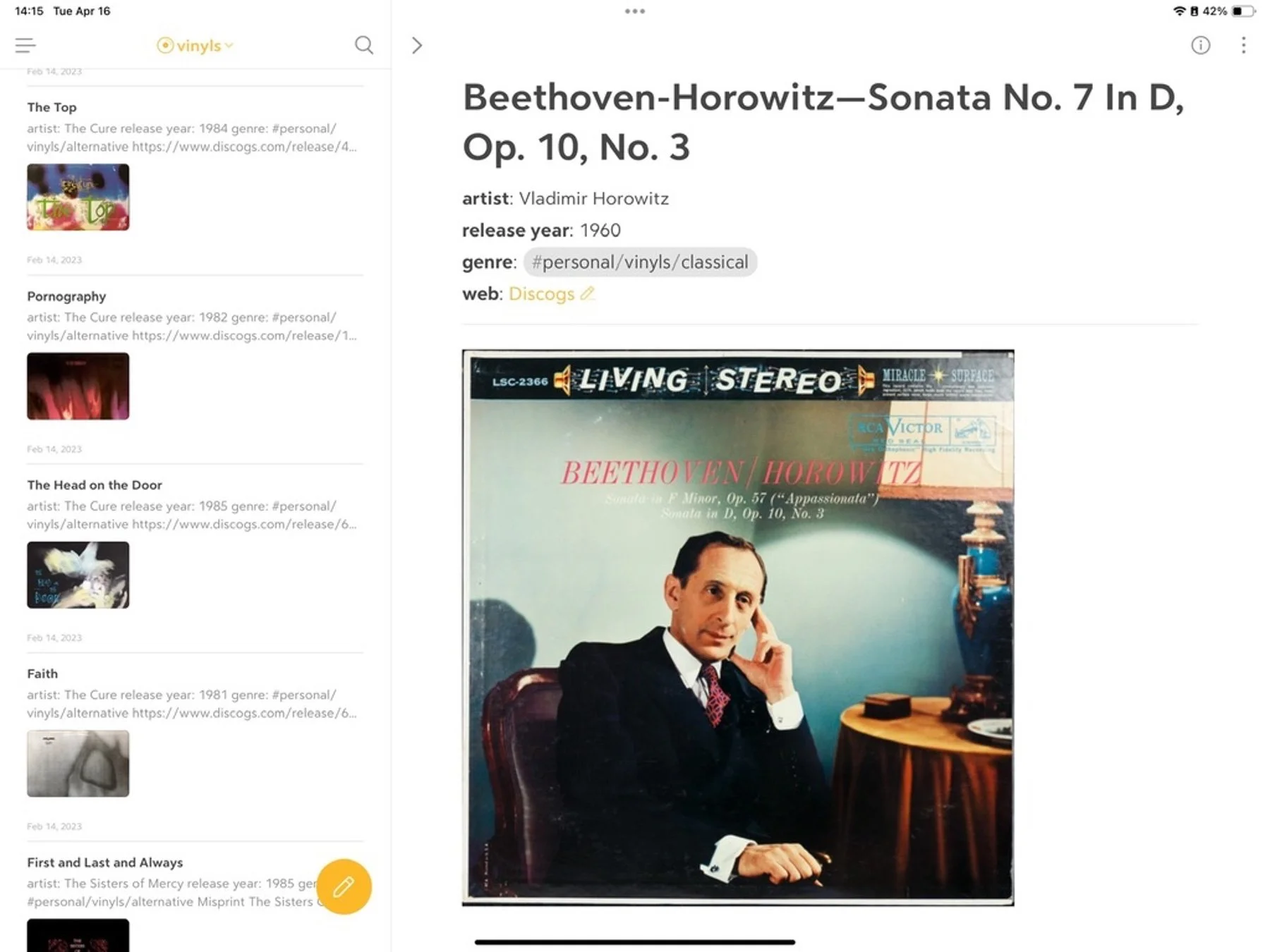
Vinyl notes in Bear (iPadOS)
Text is messy too...
So, those vinyl notes...
At the risk of repeating myself: Obsidian uses plain text files, which means all notes in a vault are easily readable with any basic text editor. Cool. But readable doesn't necessarily equal pretty—or even useful. Frontmatter (YAML), for instance, can be hidden while using Obsidian in Reading mode. But in any other app it appears as a big code block at the top of every document (2). And Dataview queries are just lines of code: like any content dependent on plugins, these don't render anywhere else.
So yes, Obsidian notes are written in plain text, but there's a caveat: the more you stray from pure Markdown, the less foolproof they become. It's something worth keeping in mind. Plug-ins provide amazing functionality, but they can also break the entire point of using text files.
That was the problem with my vinyl notes: all the metadata was in the frontmatter. Not only that: I was relying on Dataview to display the collection and catalog the music. The first issue was purely cosmetic—I wanted the notes to look cleaner. The second, less so. Hence the cleanup.(3)
Lesson learned.
...
The point I made at the onset of this series remains central to my decision: with Bear I can access and edit all of this content easily, on all my devices, without compromise.
Ultimately, that's the killer feature for me.
————————
1: But I do credit Readwise for teaching me the long term value of book notes and highlights. Again, great service.
2: Callouts look quite terrible as well, especially the multi-column flavour.
3: I also created music tags and subtags, to better organize the collection: #personal/vinyls/alternative, for example.
