
These are the three stages of AI exposure (as I've experienced them so far):
No.
Hell no.
Sigh.
In the last newsletter I wrote about signing up for the Midjourney trial, to get a better understanding of generative models. I'm still highly suspicious of AI technologies and the rush towards integrating them everywhere, without even a minimal understanding of their potential ramifications. But images are my job: I can't just sit on my beach chair, moaning about tsunamis as a giant wave towers over us, seconds away from crashing.
Midjourney is impressive, but it troubles me: I can't shake concerns over the sourcing of the images. It's just wrong. I also find the Discord-based process downright unpleasant. There's something both loud and opaque about this service that feels reckless—kids, matches, fire...consequences be damned.
Firefly is Adobe's brand new—and inevitable—incursion into this space. But unlike other generative AIs, the company is starting from copyright, using only licensed Adobe Stock content and public-domain images to power the service. It's a double-edged sword: a stock library will never be as deep of a training pool as...every piece of art ever created in any medium. But it sets the foundations for a future where artists and creators might actually matter—as active, willing, and compensated contributors to generative content.
At least there's an effort being made.
The service is in (very) early beta at the moment, but I was given access last week and thought I'd share some initial impressions. Note that images generated during the beta period can't be altered or used commercially, so everything posted on this page is straight out of Firefly (logo included).
Right now, most of the homepage is a promise, a grid of potential scenarios that aren't available yet. There are only two options to test:
Text to image
Text effects
For obvious reasons I spent most of my time with option 1, and at first glance this works just like other image-generation AIs: you write a text prompt describing what you're looking for, including as many or as few words as necessary to refine the results.

But Firefly isn't controlled solely via text input: there's a row of buttons on the side with options for styling and rendering, as well as lighting, angle, and POV, composition etc. This makes it feel like an actual app, as opposed to a bare set of commands sent to a server. It's certainly more intuitive—although in its current form it may also be more limiting: I found it hard to tell if additional technical terms I'd written into a prompt were being taken into consideration or not.
Every generation results in a grid of four images with the following options:
Show similar: refreshes the grid with variations of the selected image. [1]
Rating: to submit feedback about the image.
Download: generates a file (that embeds licensing credentials).
Submit to Firefly gallery.
Use as reference image: more on this in a sec.
Copy to clipboard.
Report.
The Use as a reference image option is a more user-friendly implementation of seed numbers in Midjourney: it creates a new starting point based on the selection. But here again, Adobe adds a layer of control to the process:
The reference image is anchored to the left of the prompt, as a visual cue.
Clicking on the reference image launches an overlay with a "balance" slider: this will change the mix between the reference and any newly generated content. Think blending. Every move of the slider forces a refresh of the entire grid.

Reference UI.
And this is where it gets interesting: with a reference image in place, we can write an entirely new prompt and mix those results with our source, using the slider to control balance between the two. We can then pick one of those images as a new reference, creating another starting point—and so on. With each pass we're refining the output, tweaking the direction, adding or removing elements as we go by writing new words into the prompt. Iteration becomes the tool.
The following sequence doesn't include every step, but it gives a rough idea of the process:


The first image is how Firefly interpreted my initial prompt, the ones that follow are iterations. Notice how the slider changes on the last two and how this affect the results.
…
Despite what you see, my first instinct was to explore photorealistic subjects, which obviously raises the bar in terms of difficulty. But I'd recently seen impressive results from Midjourney v5, so I was curious to find out how Firefly would do. Well, in this regard it's clearly early days—which wasn't entirely unexpected. There are a lot of issues with distortions, and there's just an overall lack of believability on most generated images. This is also where Adobe's sourcing might play a part: everything tends to look like a stock image. People are posed, bland and emotionless, and everything seems lifted from a product catalog (a sometimes very weird and unsettling catalog).
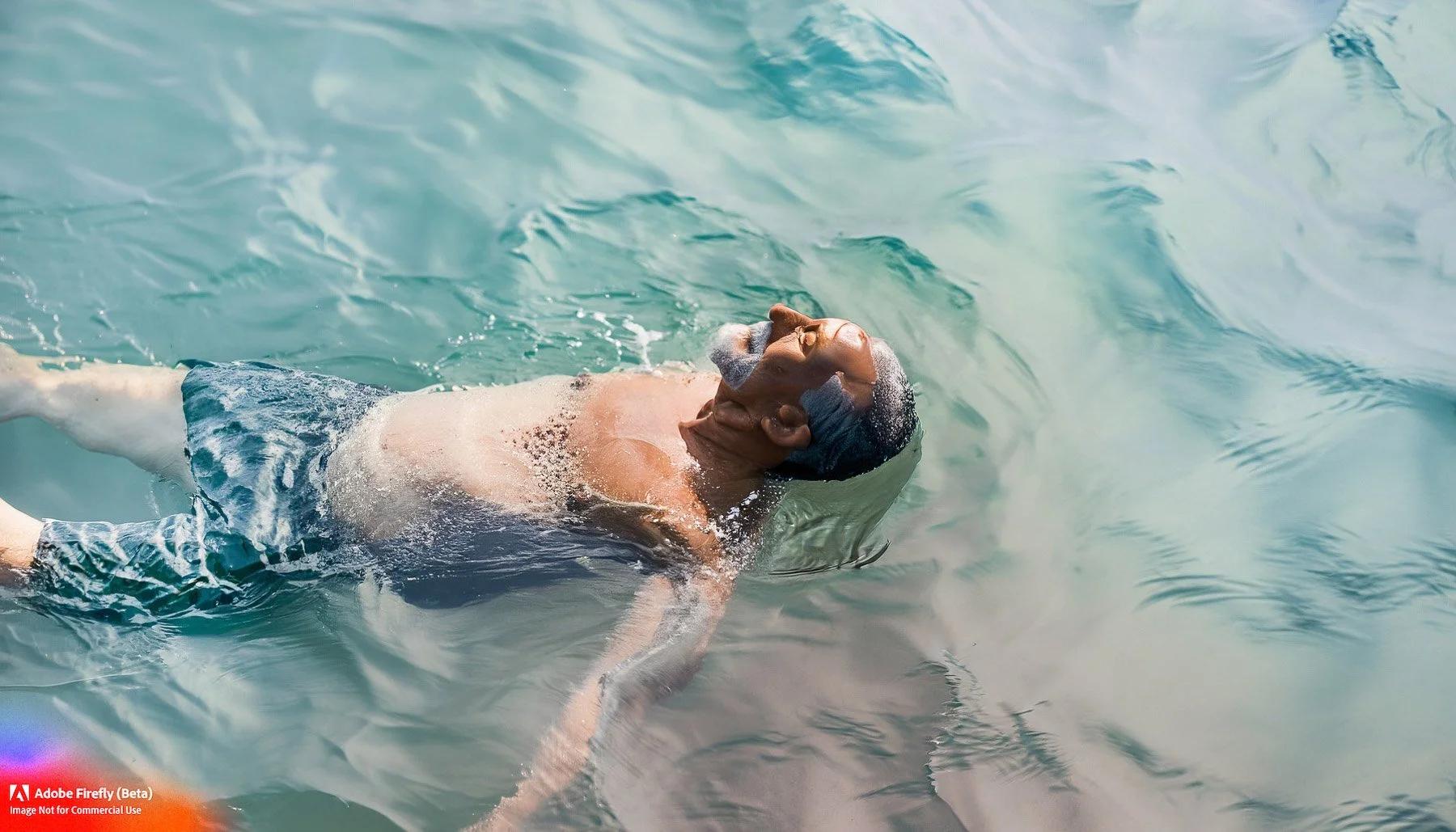
Not quite right.

This one quickly got weird and I’m not sure why: it was originally a portrait of an older man and I just asked for a red suede coat. I got red suede glasses—and a definite change of mood.
Faking photography is tough, especially with human subjects. We all know how faces are meant to look, how bodies bend, how light should shine in a person's eyes. Objects are easier, although geometry can be a challenge here as well. But I have to be honest with you: creating "real" images with an AI doesn't excite me right now. I miss the connection, the presence, and the sense of urgency. I want to be part of s scene, my eye to the camera, searching, engaging, and ready to react. I was able to generate much better results using Midjourney (v4), but I still found the process empty. Like playing with dolls. Even mildly interesting images left me cold.
Illustration, however, is another story: I'm getting a buzz from generative painting and drawing in Firefly. Probably because nothing about it can be wrong, which makes exploration kind of limitless. I started with basic prompts to understand how the system worked, but then moved to trying out snippets of more "poetic" sentences, stuff I'd written over the years, adding a few qualifiers, then remixing using the reference tool mentioned above, until something caught my eye.
The challenge with this is to find a coherent and interesting "style", despite the model's inclinations towards more standard imagery out of the box. It's like using a complex paintbrush that isn't't exactly yours, but not completely out of your control either. When I look at my attempts so far, I think there’s a certain amount of unity—despite wildly diverging beginnings.


That said, important questions remain: how much of this is me, exactly? I make it a point to iterate until images begin to look like the sort of material I'd create on my own, but could they be replicated by anyone using similar words? Or are these entirely based on someone else's illustrations, ones I've never seen, but were used to train the AI? Even with an artist's consent, I'd never want to output what amounts to... copies. Is there enough randomness built into the system to generate truly "original" artwork? And how does attribution work once a source is mixed with ten other sources, all of them unrecognizable?
I simply don't know at this point. And while none of this matters now, it eventually will.
...
Firefly, in its current form, is more like a public proof of concept, so I won't comment on everything that's missing—we can't even save workable images, or seeds, or restart a previous process [2]. It's really more of a sandbox to play in and a vehicle to offer feedback. But it IS interesting, and the company seems to have a pretty extensive plan in mind for the future.
Look, I'm still unsure of where AI is leading us, and Adobe is clearly a corporate juggernaut seeing a target worth aiming for... yet strangely, I think I might be ok with that.
I think I prefer this to the nonchalance of Midjourney's CEO, giggling nervously at his interviewer—as he sets our house on fire.
……………
With photorealistic subjects this would sometimes result in different POVs (a close-up of the hands, a different angle etc). Like a visual essay, as opposed to just basic variations of the same pose (i.e the red suede debacle).
Actually the url contains a seed number: saving this (or using the browser's history) will return similar results. But it's a clunky solution and not at all obvious. This does mean the functionality's there for an eventual UI to be added however.
