
Capture One 23
It’s that time of year again: Capture One 23 is out, like clockwork.
Let me begin by saying that I still prefer C1 to anything else I’ve tried. I know AI tools are all the rage these days but, I couldn’t care less. I enjoy this app, and I still believe it to be the best tool in all the ways that matter to me on a daily basis. But, at the risk of repeating myself, I just don’t understand their business model anymore:
Their pricing is off the charts, and no longer competitive. I’m still “grandfathered” at a lower rate, but the annual subscription price is now $250 CAD; monthly is $34 CAD; and the perpetual license is…$417 CAD. It’s gone up again this year, which is nuts. As much as I like it, I can no longer recommend Capture One to new users without some serious justification.
That subscription price doesn’t include the iPad app. Still shameful.
These “major updates” make no sense (1).
In my opinion, most features in Capture One 23 should’ve been in a point update to Capture One 22, which offered very little to begin with, and never went much further. It seems like the company is developing for subscriptions, but still releasing for standalone. The result is a loss to everyone: subscribers need to wait a year for meaningful features, while license users get very little for their money.
The two features I’m most excited about in this release are variant organization—which finally allows ONE specific variant to be added to an album without ALL other variants tagging along—and Change Capture Time (2). Both of which were possible in Aperture a decade ago. I’m happy to get them…but this is basic stuff that took far too long to get here in my book.
The standout features are Smart Adjustments, Culling, and Layers in Styles.
Smart Adjustments
According to Capture One:
Reduce editing time massively with Smart Adjustments. Get a similar look across photos that are shot under different lighting conditions by automatically adjusting Exposure and White Balance – optimized for portraits, weddings, or other jobs featuring people.
People being the operative word because it won’t work otherwise.
I compared the results of using Smart Adjustments with those of a simple copy/paste of Exposure and WB settings: it wasn’t conclusive. I actually preferred the copy/paste versions. So for me, the jury’s out on this. Your mileage may vary, however, as this is highly dependent on the images themselves. Wedding photographers are probably the obvious target for this feature. But then…different lighting conditions may not always need to look similar?
Culling
There’s a new culling tool as well. It’s available during import, but also in the library after files have been ingested. The idea is that it can group similar shots, to make selection easier. I tried it on a set of images, playing with the grouping similarity slider to see how it would do: it works. But I’m not sure what the point is because it’s chronological—it only groups images that are already next to each other.
For example, say you have five images of a fire hydrant that were shot at 10 AM, then another similar set shot at 1 PM, with street pics in-between. All those fire hydrant images won’t be grouped together: you’ll get one group for the morning images, and another for the ones captured in the afternoon—with those same street pics in-between. In the following screenshot, wouldn’t it be more useful (and logical) for the images in the blue and red rectangles to be grouped?
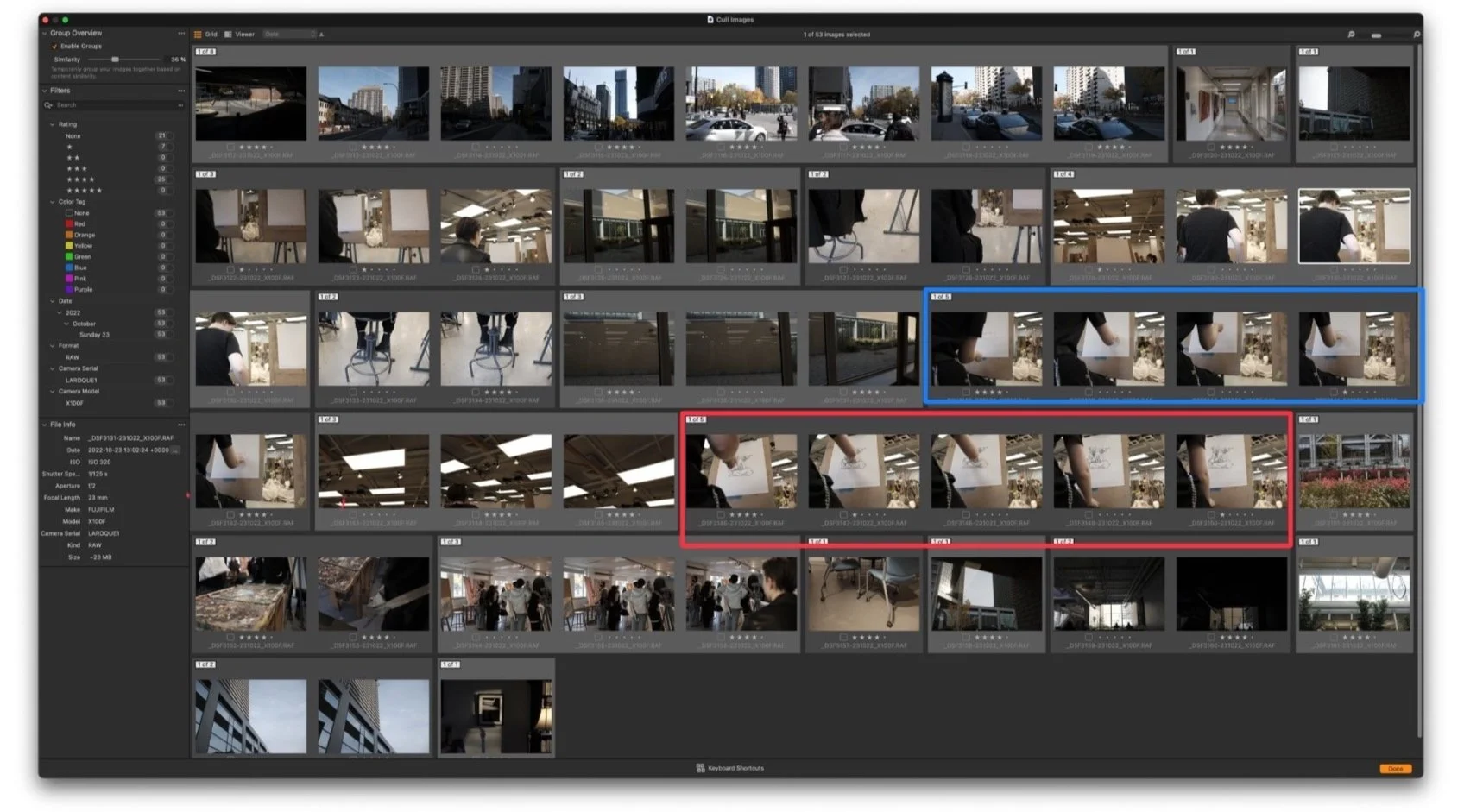
A few more could be grouped together: I added the rectangles quickly.
Apart from seeing a light or dark gray outline around the grouped images, how is this different from looking at them sorted by date in the Browser? I mean, I can already tell they’re similar. Maybe I missed something, but right now, I’m perplexed.
Layers in Styles
This might be fun, and it’s also self-explanatory: it’s now possible to save multiple layers as part of a single style. Combined with opacity sliders in layers, it opens up even more re-usable processing capabilities. Simple. I like this.
…
Is 23 worth the upgrade? Perhaps. If I had the standalone version I’d probably bite the bullet, mostly to get those Aperture features I mentioned. Some of the others would join Speed Edit in the pantheon of stuff-I-forgot-was-there. But I wouldn’t be thrilled, which might eventually be an issue?
So yeah, Capture One 23 is out.
Like clockwork.
––––––––––––––––––––––––––––––––
1. Six new features—including the ability to change capture time metadata.
2. I mean, come on.
